Arduino IDE has inbuild Serial Monitor through which can be used to read or transmit data serially. In this section, we are going to read the analog signal from the potentiometer and display the readings as voltage levels between 0V to 5V on Serial Monitor.
CONCEPTS
To know more about a potentiometer read this.
In Arduino, the input analog signal resolution is 10 bit which means 2^10=1024 values. Therefore to display these readings as voltage level between 0-5 volts we will map these values by multiplying the range of input resolution with 5.0/1023.0 (note that total values are 1024 but the counting starts from 0 to 1023, therefore we will use 1023 as a divisor).

COMPONENTS
- Arduino Uno – 1 | purchase
- Potentiometer 10K – 1 | purchase
- Resistor 220Ω -1| purchase
- Breadboard – 1 | purchase
- Connecting Wires as required | purchase
CONNECTIONS
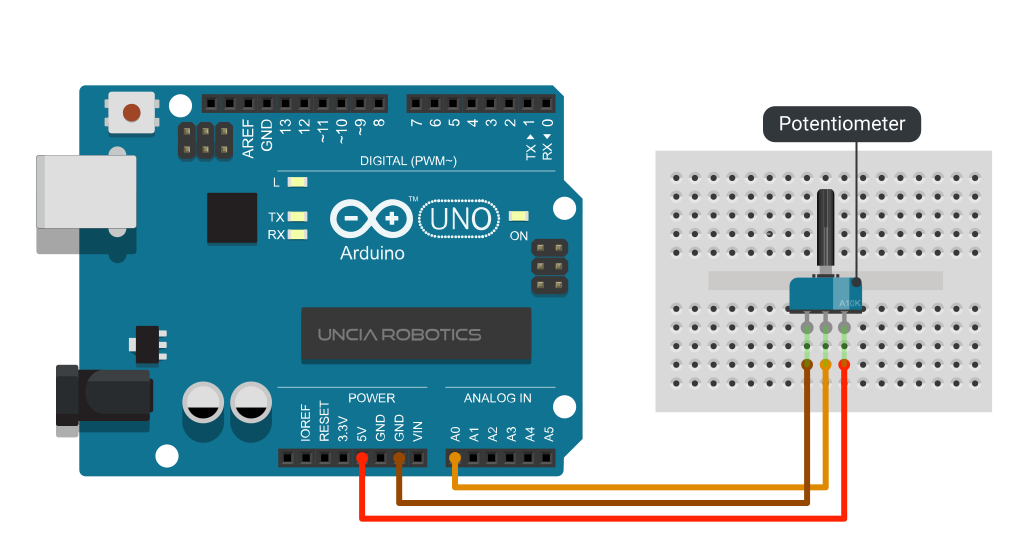
PROGRAM:
Program: Read voltage from analog pin using serial monitor
/*UNCIA ROBOTICS | www.unciarobotics.com
  PROGRAM: READ VOLTAGE FROM ANALOG PIN USING SERIAL MONITOR
  Reads an analog input on pin 0, converts it to voltage,
  and prints the result to the Serial Monitor.

  Connections:
  A0     Potentiometer
*/

void setup() {
  Serial.begin(9600);     //start serial communication
}

void loop() {
  int sensorValue = analogRead(A0); //read input
  // Convert input (0 - 1023) to a voltage (0 - 5V):
  float voltage = sensorValue * (5.0 / 1023.0);
  Serial.println(voltage);          //print values
}
FUNCTIONS USED
analogRead( )
Description: Reads the value from a specific analog Pin. Arduino boards contain multichannel ADC (Analog to Digital) converter. Furthermore, It has 10 bits of default resolution. For this reason, if you provide 5 Volts of power supply it can divide it into 1024 steps of 0.0049V or 49 mV each. Below is the list of analog pins in case of Arduino, Nano and Mini.
| Board | PWM Pins | Maximum Resolution |
| Arduino Uno | A0, A1, A2, A3, A4, A5 | 10 Bit |
| Mini, Nano | A0, A1, A2, A3, A4, A5, A6, A7 | 10 Bit |
Syntax: analogRead (pin);
- pin: the Arduino PIN number ( A0 to A5). | Allowed data types: int
Returns: Analog reading on the pin | Allowed data type: int
Notes and Warnings:
- If the analog input pin is not connected to anything it will return random values.
Serial.begin( )
Description: Starts Serial communication at a given baud rate. To communicate with computer you can use these baud rates: 300, 600, 1200, 2400, 4800, 9600, 14400, 19200, 28800, 38400, 57600, or 115200. You can however specify any other baud rate connected at TX and RX pins of Arduino
Syntax: Serial.begin(baud); or Serial.begin(baud, config);
- Serial: which serial port you are using. Depends on the device you are using.
- baud: speed in bits per second | Allowed data types: long
- config: sets data, parity, and stop bits. (see list)
Returns: Nothing
Notes and Warnings:
- Different microcontrollers can have multiple Serial ports (see list). You can use them by calling them with the given name.
Serial.println( )
Description: Prints data on Serial monitor as a human-readable form followed by a carriage return character and a newline character.
Syntax: Serial.print( (val, base);
- Serial: Serial port object. See the list of available ports for different boards.
- val: the value to print.| Allowed data types: any
- base: specifies the number base. (know more)
Returns: number of bytes written, though reading that number is optional. Data type: size_t
Notes and Warnings:
- This command takes the same forms as Serial.print( ).